Why the Same Sentence Should Sound Different in Every App
Say: "Can you send me the draft by Friday and flag any blockers?"
Into Mail, that's a polite, complete request. Into Slack, it should be shorter , "draft by Friday, flag blockers?" Into a task tool, it becomes an action item. Into notes, a bullet. Into a code editor? The tool should probably stop polishing and preserve your terms exactly.
A context-blind app gives every destination the same treatment. That's not neutral. It's wrong.
I learned this the hard way. I was dictating into Slack , casual, quick, my normal voice. Then I switched to email, dictated the same kind of message, and sent it before reading. My client got "hey just checking in on this thing." I wanted to crawl under my desk.
What generic dictation optimizes for (and why it's not enough)
Generic dictation optimizes for word capture: did the words become text? Slightly better dictation optimizes for punctuation. Better still, it adjusts tone and structure for the destination.
Most tools stop at "words became text." But here's the thing: communication work is already scattered. Microsoft's Work Trend Index repeatedly describes workers drowning in fragmented communication. A tool that reduces rewriting across surfaces helps precisely because you're already switching contexts all day.
Another medium-weight paragraph to edit is not progress. It's admin in a nicer coat.
Generic dictation
One tone, every app
- Same polish in Mail, Slack, Notes
- You edit the tone yourself, every time
- Predictable, but tone-deaf
Context-aware
The right tone, every app
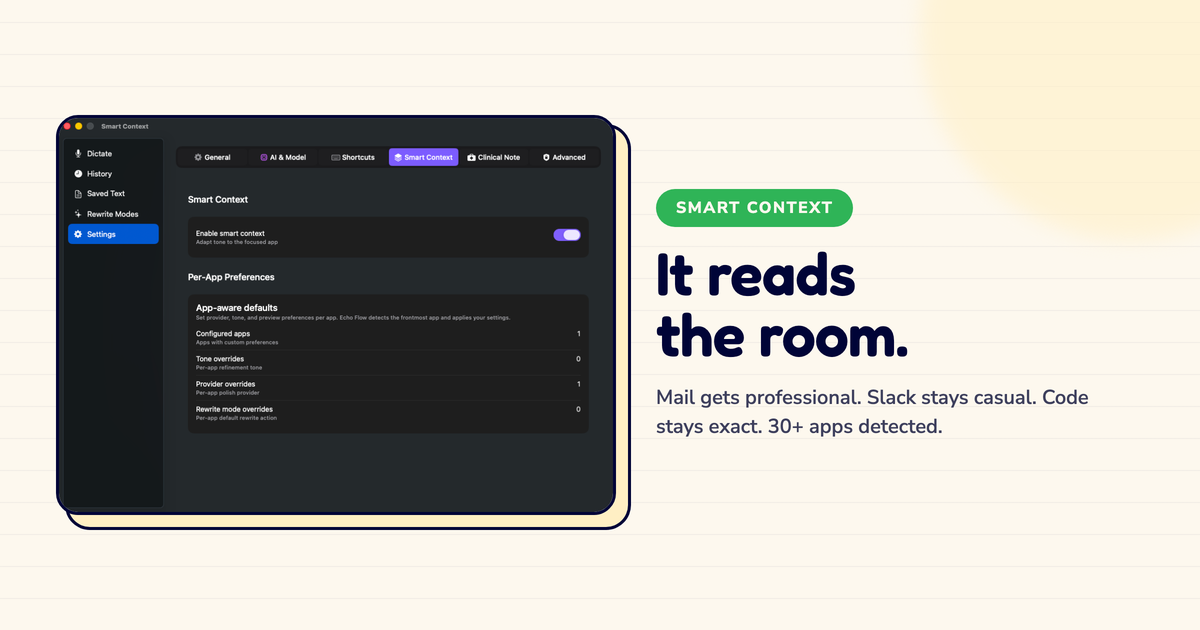
- Mail gets professional, Slack gets casual
- Less editing after the fact
- Requires app-detection permission
The reference-grade definition
Context-aware dictation is dictation that uses the active app, user preferences, and selected workflow to choose formatting and tone before text is inserted.
That definition matters. It excludes generic "AI polish" that always behaves the same way. It also excludes systems that require you to manually choose a tone every time. The default should be smart enough for routine work and editable when routine becomes weird.
I tested this. I dictated the same sentence into four different apps using a popular dictation tool. Identical output every time. Four different audiences, four different expectations, one flat tone. I had to edit three of them.
Why app context is a useful signal (and when it's not)
The active app is a cheap but powerful clue. Mail usually implies email tone. Slack implies brevity. Notes implies structure. Code editors imply verbatim caution. Project tools imply tasks and owners.
Echo Flow uses this signal through Smart Context, then lets users override app-level tone when their workflow disagrees with the default. That second part is essential. Otherwise the tool becomes a tiny etiquette tyrant.
I override mine about once a week , usually when I'm writing a casual email to a collaborator I know well. The default says "formal." I say "not this time."
1 in 5
Dictations I still tweak manually , down from 4 in 5 before Smart Context
The counterexample: clever prose in the wrong place
A beautifully polished paragraph can still be a failure. A Slack reply that reads like board minutes wastes social bandwidth. A code comment rewritten into marketing copy destroys precision. A customer email that is too casual creates risk.
People do not just read words. They read fit.
I learned this when I dictated a quick Slack message to my teammate: "Following up on the deliverables , can we sync briefly this afternoon?" Perfect for email. Absurd for Slack. He sent back a laughing emoji. Rightfully so.
The honest note
Context-aware dictation is not mind reading. It knows the category , email, chat, notes , and applies a reasonable default. Sometimes the default will be wrong, and when it is, you edit. The goal is not to eliminate editing. It is to eliminate the predictable editing you do every single time you switch apps.
How I test it (you can too)
Test one sentence across five surfaces: email, chat, notes, ticketing, and code. If the output is identical, the tool is not context-aware.
Test protected vocabulary in each surface. Test a short note and a long paragraph. Test a high-stakes email with preview enabled. The point is not to find the prettiest demo. The point is to see whether the text arrives closer to done.
I do this every few updates. Just to be sure the context detection still works after macOS updates. So far, so good.
The forward view
Writing tools will move from generic prompt boxes toward local context layers: app, selection, vocabulary, permission state, tone preference, and user intent.
That sounds less glamorous than "agentic transformation." It is more useful. Echo Flow fits this future because it treats context as plumbing, not sparkle. The app you are in should matter before the text lands, not after you start cleaning it up.
Without context
Dictate → get flat output → notice wrong tone → open AI tool → fix tone → copy back → keep writing
With context
Dictate → get right tone for this app → keep writing
The bottom line
Context-aware dictation is not magic. It is respect for the destination. The same words can be appropriate, awkward, risky, or useless depending on where they land. Tools that ignore that force users to pay an editing tax. Tools that use app context remove small mistakes before they appear.
I don't think about tone anymore. I just dictate, and it lands right. That's the goal.
Try Echo Flow free for 14 days · How Smart Context works · Why private dictation
Sources
- Microsoft Work Trend Index: documents the cost of fragmented communication.across surfaces.
- Echo Flow's SmartContextService: detects the frontmost app and resolves a per-app tone and polish profile.
- Apple AXUIElement / accessibility APIs: used to observe the active application locally.